


Permission creep is what happens when an employee’s access keeps growing while their actual job stays the same, or even gets smaller. Nobody plans it. It builds up one reasonable request at a time, until someone who moved from finance to marketing three years ago can still open the payroll folder.
If that sounds uncomfortably familiar, you’re in good company. Permission creep is one of the most common identity and access management problems in Australian workplaces, and one of the least visible. There’s no alert, no error message and no angry customer. The extra access just sits there, waiting for the day someone abuses it or someone else steals it.
This guide explains how permission creep develops, why it matters far more than most teams realise, and what practical steps you can take to bring access back under control. We’ll also look at why the skills needed to fix it have become a genuine career opportunity for anyone building a future in cyber security certification training.
What Is Permission Creep in Cyber Security?
Permission creep, sometimes called privilege creep or access creep, is the gradual build-up of access rights beyond what a person needs to do their current job. Each permission was granted for a good reason at the time. The trouble is that almost nobody takes them away again.
Think of a keyring that only ever gets heavier. A new starter receives a handful of keys. After a promotion they get a few more. A short project adds three, a cover shift adds two. A decade later they’re carrying keys to rooms they haven’t entered in years, and nobody remembers which doors those keys open.
In security terms, permission creep is the opposite of the principle of least privilege: the idea that every user, device and application should hold only the minimum access required to do its task. The NIST definition of least privilege is a handy reference if you want the formal wording.
How Permission Creep Happens in Everyday Workplaces
It rarely comes from carelessness. It comes from helpfulness, speed and good intentions. These are the usual culprits:
- Role changes with no clean-up. When someone transfers or gets promoted, the new access is added but the old access stays. IT teams call this the “mover” problem, and it’s the biggest single driver of permission creep.
- Temporary access that becomes permanent. A contractor needs admin rights for a weekend migration. The migration finishes. The rights don’t leave.
- “Just make it the same as Sarah’s.” Copying one colleague’s permissions to a new starter is fast, and it quietly carries over every historical extra that colleague ever collected.
- Project and shared-drive sprawl. Teams spin up folders, SharePoint sites and Teams channels for short projects, then forget them. Everyone who was ever invited keeps their seat.
- Approval fatigue. Busy managers approve access requests in seconds because saying no creates friction and saying yes doesn’t, at least not today.
- Mergers, restructures and cloud sprawl. Every new SaaS tool, subscription and acquired business adds another pile of accounts that nobody owns.
Individually, none of these look dangerous. Together, they create an organisation where the real access map looks nothing like the org chart. That gap is permission creep at scale.
Why Permission Creep Is a Serious Security Risk
Excess access is harmless only until the account that holds it gets misused. Then it becomes the single factor that decides how bad the day gets.
It widens the blast radius of a compromised account
Phishing remains one of the most common ways attackers get in. When a stolen login belongs to someone with tightly scoped access, the damage stays limited. When it belongs to someone with years of accumulated permissions, the attacker inherits all of it. Ransomware crews love these accounts because they allow lateral movement across file servers, cloud tenants and databases without needing to break anything else.
It makes insider threats easier
Most insider incidents aren’t dramatic. A departing employee downloads a client list they technically still have access to. A well-meaning team member forwards a sensitive spreadsheet because they could. Permission creep removes the speed bump that might have stopped either one.
It undermines Zero Trust before it starts
Zero Trust assumes no user or device is trusted by default and that access must be verified continuously. That model falls apart if the underlying permissions are already bloated. You can’t verify your way out of an account that is allowed to do everything.
It creates audit and compliance headaches
Auditors ask a simple question: who has access to this system, and why? Organisations with permission creep struggle to answer it. That matters under frameworks such as ISO/IEC 27001, SOC 2 and the Australian Government’s Essential Eight, all of which expect access to be controlled and reviewed.
A Realistic Permission Creep Example
Here’s a composite scenario that mirrors what security teams see all the time. Priya joins a Melbourne logistics company as a payroll officer. Two years later she moves into HR operations. IT adds HR system access on her first day in the new role, but nobody removes payroll. During a busy quarter she’s also added to a finance reporting group for a month. The month ends. The group membership doesn’t.
Now Priya’s account can view salary data, HR records and finance reports. She has never done anything wrong. But when her credentials turn up in a phishing kit, an attacker suddenly holds one account that touches three of the company’s most sensitive systems.
That’s how permission creep turns a routine credential theft into a reportable data breach.
Warning Signs of a Permission Creep Problem
Not sure whether your organisation is affected? Check how many of these sound familiar:
- Nobody can produce a current list of who has access to your most sensitive systems.
- Staff who changed teams more than a year ago still belong to their old groups.
- Admin or global admin rights are held by more people than you can name from memory.
- Former contractors and interns still appear in your directory.
- Access requests get approved, but access is almost never removed.
- People in the same role have wildly different permissions.
- Your last access review was a one-off exercise before an audit.
If you ticked two or more, you almost certainly have permission creep already. Don’t panic. Nearly every organisation does.
Permission Creep vs Least Privilege: What’s the Difference?

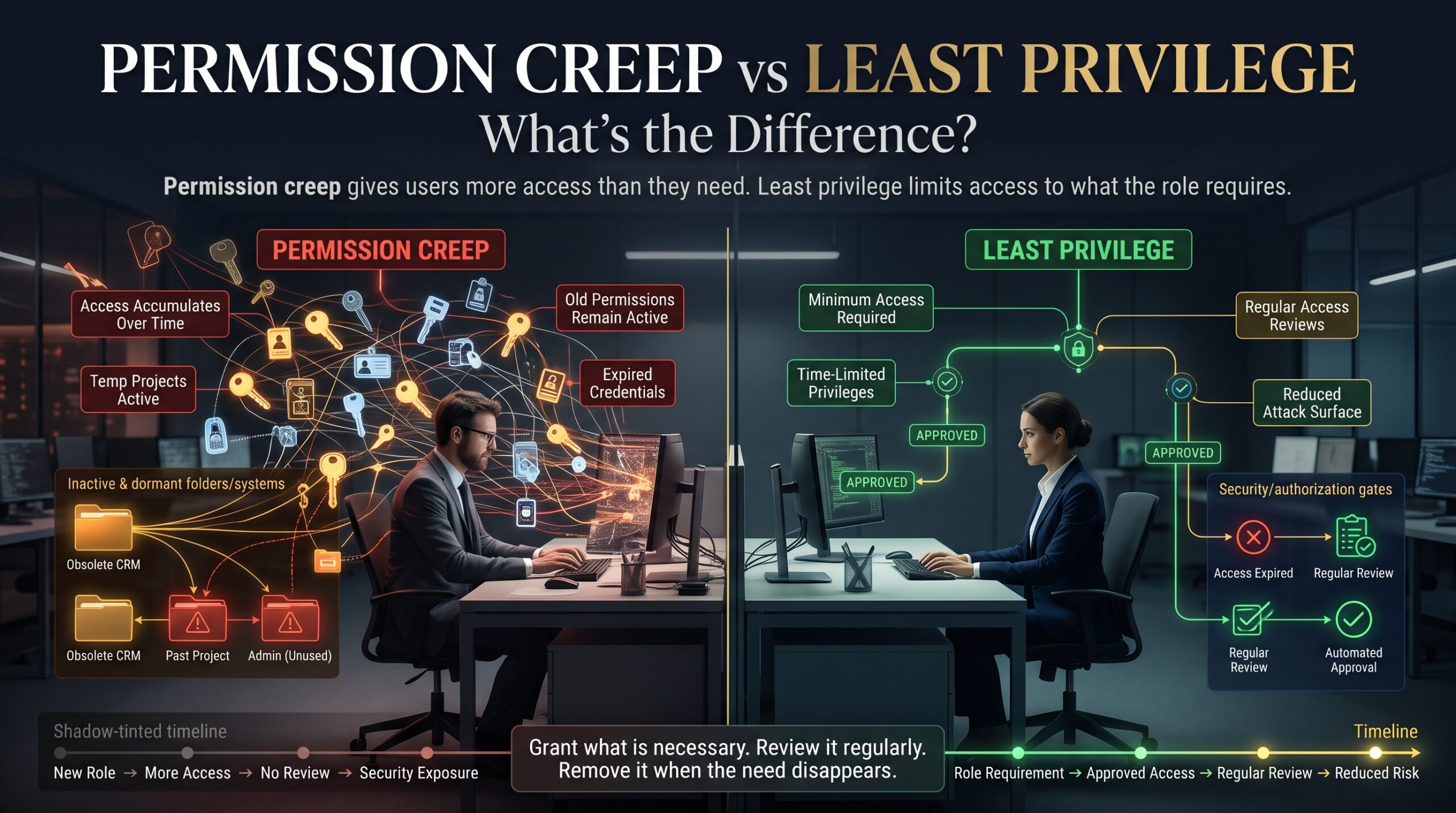
| Area | With permission creep | With least privilege |
| Access growth | Accumulates quietly over time | Matches the person’s current role |
| Role changes | New rights added, old rights kept | Old rights removed automatically |
| Temporary access | Becomes permanent by default | Expires on a set date |
| Admin accounts | Widely held and rarely reviewed | Few, monitored and time-limited |
| Audit readiness | A manual scramble | Reports available on demand |
| Breach impact | Large blast radius | Contained to a small area |
How to Fix Permission Creep: A Practical Step-by-Step Approach
You don’t need a seven-figure identity programme to make real progress. Start small and stay consistent.
1. Start with an access inventory
List your critical systems first: payroll, finance, customer data, source code and cloud admin consoles. For each one, record who has access and who approved it. Perfection isn’t the goal. Visibility is.
2. Build role-based access control (RBAC)
Define standard access bundles for each job role instead of copying permissions from person to person. When someone changes roles, the bundle changes with them.
3. Run regular access reviews
Ask system owners and managers to confirm, at least quarterly for sensitive systems, that each person’s access is still needed. Tools such as Microsoft Entra access reviews can automate the reminders and record every decision, which makes audits far less painful.
4. Automate the joiner, mover and leaver process
Connect HR events to your identity platform so a role change or resignation triggers access changes automatically. Manual tickets are where permissions go to be forgotten.
5. Use time-bound access for privileged accounts
Privileged access management lets administrators request elevated rights only when they need them, for a limited window. When the window closes, the access disappears without anyone having to remember.
6. Monitor and alert on unusual access
Feed identity logs into your SIEM so unusual behaviour, such as an HR officer querying finance databases at midnight, gets flagged early. Pair this with multi-factor authentication on every account that can reach sensitive data.
None of this is glamorous. All of it works.
Permission Creep and Australian Compliance Obligations
For Australian organisations, permission creep isn’t only a technical annoyance. Under the Privacy Act 1988, Australian Privacy Principle 11 requires entities to take reasonable steps to protect personal information from misuse, interference, loss and unauthorised access. If someone with unnecessary access causes a breach, “we never got around to cleaning up permissions” is a difficult explanation. The OAIC Notifiable Data Breaches scheme also requires eligible breaches to be reported, and excess access often determines how many records end up exposed.
The Australian Cyber Security Centre’s Essential Eight lists restricting administrative privileges as a core mitigation strategy. Tackling permission creep moves you directly toward that goal, and it strengthens the trust customers place in you. We explore that idea further in our article on digital trust as a business asset and in how to protect business data.
Why Permission Creep Skills Matter for Your Cyber Security Career
Organisations everywhere are hiring people who can find and fix permission creep. Identity and access management sits at the centre of security operations, cloud security and governance, which is why so many cyber security job descriptions mention it. If you want to build these skills formally, several certifications cover them directly:
- CompTIA Security+: covers identity and access management, least privilege and access control models. A solid starting point for beginners.
- CompTIA CySA+: teaches analysts to spot suspicious account activity and respond to incidents.
- AZ-500 Microsoft Azure Security Technologies: goes deep on Entra ID, privileged identity management and conditional access.
- PCNSA: focuses on Palo Alto firewall policy and user-based access control.
- CompTIA PenTest+: shows how attackers exploit over-privileged accounts, which is invaluable when you’re defending against them.
Training is available in Melbourne, Sydney, Brisbane, Adelaide, Canberra and Perth, with live online options for learners anywhere in Australia. New to the industry? Start with our beginner-friendly resources at cybersecuritycourse.au, explore the wider Logitrain cyber security courses, or read why professionals with the right credentials become indispensable.
Frequently Asked Questions About Permission Creep
What is permission creep in simple terms?
It’s the slow build-up of access an employee no longer needs. Each permission made sense when it was granted, but nobody removed it when the job, project or team changed.
How often should access reviews happen?
A common starting point is quarterly for sensitive systems and admin accounts, and at least every six months for everything else. Adjust the schedule to your risk level and compliance requirements.
Is permission creep the same as privilege escalation?
No. Privilege escalation is an attack technique where someone gains higher access than they were granted. Permission creep is organisational drift, where legitimate access accumulates over time. The two are connected, though, because permission creep makes escalation far more rewarding for an attacker.
Can small businesses suffer from permission creep?
Absolutely. Small teams often share logins and grant broad access for convenience, so permission creep can be worse in a ten-person company than in a large enterprise with formal processes.
Which certification helps most with access control skills?
CompTIA Security+ is the best foundation for identity and access concepts. If you work in a Microsoft environment, AZ-500 adds hands-on depth in Entra ID and privileged access.
Final Thoughts: Take Back Control of Access
Permission creep never announces itself. It grows in the gaps between busy days, role changes and well-meaning approvals. The good news is that it’s fixable, and the fix is mostly discipline rather than expensive technology: know who has access, give people only what they need, and review it on a schedule.
If you’d like to turn that knowledge into a recognised qualification, our team can help you choose the right pathway. Contact us or call 1300 649 299 to talk through course dates, delivery options and your next career step.