


Incident evidence loss happens when the people trying to stop a cyber attack accidentally destroy the clues that would explain it. It is rarely careless. It is usually a skilled, stressed responder doing the obvious thing at speed: rebooting the server, wiping the laptop, deleting the malicious email, resetting every password. The attack stops. The explanation disappears with it.
A few weeks later, the questions arrive. How did they get in? What did they touch? Was customer data taken? Can we be sure they are gone? An organisation that has suffered incident evidence loss often cannot answer any of them with confidence, and that uncertainty can cost more than the attack itself.
This article explains why incident evidence loss is so common, which containment habits cause it, what it costs and how security teams can contain an attack without erasing the trail. It is written for security analysts, IT administrators and managers in Australian organisations, and it stays at the level of good practice rather than attacker technique.
What Is the Incident Evidence Loss Problem?
Every cyber incident leaves traces: running processes in memory, network connections, log entries, modified files, new accounts, scheduled tasks and the original malicious message. Together they are the evidence that lets a team work out what happened, how far it spread and how to stop it happening again.
The incident evidence loss problem is the tension at the heart of incident response. Containment says “stop the damage now”. Investigation says “do not touch anything until we have captured what is there”. Both are right, and in the first hour of a real incident they pull in opposite directions. Teams without a plan nearly always choose speed, and evidence is the price.
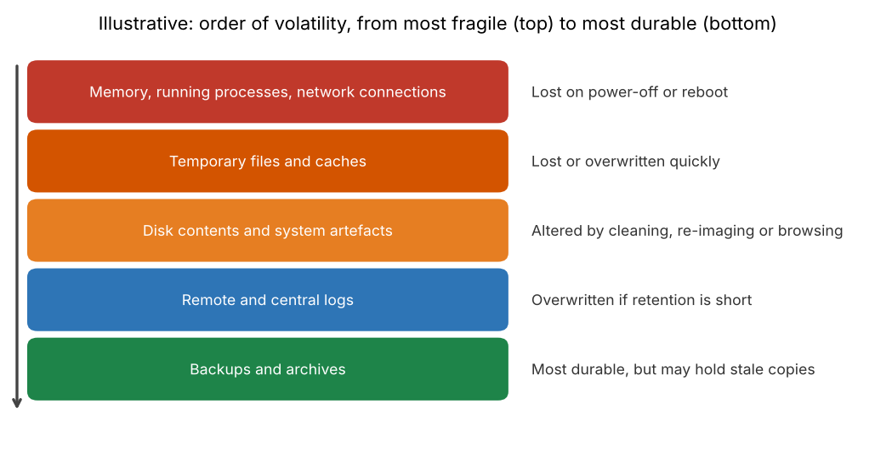
The field that studies this is digital forensics, and one of its oldest rules is the order of volatility: collect the most fragile evidence first. The IETF guidance in RFC 3227 on evidence collection and archiving sets this out clearly, and it remains a useful reference decades on.
Why Cyber Teams Destroy Clues While Containing an Attack
Incident evidence loss is almost never one bad decision. It is the result of several ordinary pressures at once:
- Restoring service feels more urgent than understanding. Executives want systems back. Every minute of downtime is visible, while lost evidence is invisible until later.
- There is no written evidence step in the playbook. Many incident response plans say “contain, eradicate, recover” and stop. Nothing tells the responder to capture memory or take a snapshot first.
- The wrong people are first on the scene. Help desk staff and system administrators are often the first to see a problem. They know how to fix machines, not how to preserve them.
- Automation moves faster than people. Tools that quarantine, delete or rebuild systems automatically can remove evidence before anyone has decided it is needed.
- Logs are shorter-lived than the investigation. If central logs are kept for a short time, or devices overwrite local logs quickly, the trail can be gone before the incident is even detected.
- Responders contaminate the scene. Logging into a compromised machine and clicking around changes timestamps and artefacts, and running tools on the host can overwrite the very data you want.
- Nobody has authority to make the trade-off. If no one is empowered to say “wait ten minutes for a memory capture”, the default is always to act immediately.
Common Containment Habits That Cause Incident Evidence Loss
These are the habits we see most often when we talk with security teams. Each one is understandable, and each one can be avoided:
- Powering off or rebooting the affected machine. This discards volatile data such as memory contents, running processes and active network connections. In some situations shutting down is the right call, but it should be a decision, not a reflex. Isolating the device from the network, for example through endpoint tooling, usually contains it while keeping it powered on.
- Wiping or re-imaging straight away. It is a fast route to a clean system and a very effective way to erase the disk evidence of how the intruder got in.
- “Cleaning” files in place. Deleting suspicious files, or letting antivirus remove them, destroys samples that analysts need to understand the threat.
- Purging the phishing email everywhere first. Removing a malicious message from every mailbox is sensible, but only after a copy with full headers has been preserved.
- Resetting accounts before recording them. Disabling or changing credentials stops misuse, yet without first noting which accounts were affected and when, the scope of the breach is harder to establish.
- Terminating cloud resources. Deleting or auto-replacing virtual machines and containers removes disks and instance state unless a snapshot was taken first.
- Poor note-taking. Without a timestamped record of who did what and when, even well-preserved evidence becomes hard to trust or explain.
What Incident Evidence Loss Really Costs
Consider a hypothetical example. A small finance business finds malware on a file server. The IT lead, working late, reboots it, runs a clean-up tool and rebuilds it from a backup within hours. Service returns the next morning, and everyone is relieved.
Two weeks later, the company’s cyber insurer and a major client both ask how the attacker got in and whether any client files were accessed. Memory is gone, the disk has been rebuilt and the relevant logs rolled over. The honest answer is “we do not know”. The business cannot rule out data theft, cannot prove the vulnerability is closed and cannot give either party the assurance they want.
That story captures the real costs of incident evidence loss:
- Unknown root cause. If you do not know how the attacker entered, you cannot be sure they cannot come back.
- Unknown scope. You cannot tell which systems and which data were touched, so you may over-notify, under-notify or wait too long to decide.
- Regulatory and legal exposure. In Australia, organisations covered by the Privacy Act must assess suspected eligible data breaches promptly under the Notifiable Data Breaches scheme run by the Office of the Australian Information Commissioner. Good evidence makes that assessment possible. This is general information, not legal advice, so involve your legal and privacy teams.
- Insurance and contractual friction. Insurers, clients and regulators increasingly expect a clear account of what happened.
- Weak lessons learned. Without evidence, the post-incident review becomes guesswork, and the same gaps remain open.
Good guidance from the Australian Cyber Security Centre consistently stresses preparation, and preparation includes deciding in advance how evidence will be handled.
How Incident Evidence Loss Happens: Understanding the Order of Volatility
Not all evidence is equally fragile. Memory and active network connections vanish in an instant. Temporary files and caches disappear quickly. Disk contents last longer but can be overwritten or altered by clean-up. Central logs survive until retention limits overwrite them, and backups are the most durable, though they may not capture the moment of compromise.
The practical lesson for avoiding incident evidence loss is simple: the more volatile the evidence, the sooner it needs to be captured, and the more careful you must be before taking actions that destroy it. A good response plan builds that sequence into the first steps rather than leaving it to memory under pressure.
How to Prevent Incident Evidence Loss
The aim is not to slow containment down. It is to build a short, rehearsed evidence step into it. Here is a practical approach:
- Plan for it before an incident. This is often called forensic readiness: centralised logging, accurate time synchronisation, sensible log retention and tooling that can capture memory and disk images or take cloud snapshots quickly.
- Put evidence steps in the playbook. For each common incident type, write down what to capture first, who captures it and how long it should take.
- Isolate before you power off. Where possible, cut the device off from the network while leaving it running, then decide calmly whether and when to shut it down.
- Capture volatile data first. Record memory, running processes and network connections before anything is cleaned, rebuilt or restarted.
- Preserve and protect copies. Take snapshots or images, create cryptographic hashes and work on copies, so the original stays intact. Keep a clear chain of custody record of who handled what and when.
- Keep an incident journal. Log every action with a time (use one time zone consistently), the person responsible and the reason. This protects both the evidence and the team.
- Preserve before purging. Save malicious emails, files and cloud logs before removing them from the environment.
- Decide who can trade off speed and evidence. Name an incident lead with the authority to hold the response for a short, defined capture window, and make sure they know when it is not appropriate, for example when data is actively being destroyed or encrypted.
- Run tabletop exercises that include the awkward moment where the business wants a system back and the analyst wants a capture first.
Teams that tackle incident evidence loss this way tend to find the extra evidence step adds minutes, not hours, and gives them far better answers when the hard questions arrive. Understanding the broader framework helps too: see the overview of computer security incident management.
Cyber Security Courses That Build Incident Response Skills
Preventing incident evidence loss is a skill, and like most security skills it improves with structured training and practice. These Cybersecurity Certifications programs build the knowledge behind good incident handling:
- CompTIA Security+ is an entry-level, all-round cybersecurity course that builds a solid foundation, including the fundamentals of responding to incidents.
- CompTIA CySA+ is an advanced course focused on threat detection and analysis, a natural fit for analysts who triage and investigate incidents.
- CompTIA PenTest+ is aimed at professionals working in penetration testing, helping defenders understand how attacks unfold.
- Palo Alto PCNSA suits security engineers working on Palo Alto firewalls and network enforcement.
- Microsoft AZ-500 covers Azure security, relevant for teams who must preserve evidence in cloud environments.
You can compare every option on the cyber security courses page. For related reading, see our articles on the cybersecurity visibility gap, security alert overload, detection rule decay and security control effectiveness.
Incident Evidence Loss Across Australian Cities
Incident evidence loss is not tied to one place, but the pressures differ. In Sydney, financial services and technology firms face intense demands to restore trading and customer services fast, which pushes responders toward quick fixes. Melbourne organisations in healthcare, retail and government often hold sensitive personal data, so a clear account of what was accessed matters.
In Brisbane, infrastructure and project-based businesses rely on many contractors and systems, which makes scoping harder. Perth resources and energy companies manage remote operational environments where downtime is costly. Canberra agencies work within strict security and reporting expectations, and Adelaide organisations of every size face the same containment-versus-evidence decision.
Training is available in person in major cities and live online across Australia. See all cybersecurity certification locations for options near you.
Frequently Asked Questions About Incident Evidence Loss
What is incident evidence loss?
It is the destruction or alteration of digital evidence during an incident response, usually by well-meaning containment actions such as rebooting, wiping or cleaning affected systems before the evidence has been captured.
Should you turn off a computer during a cyber attack?
Not as an automatic reflex. Powering off discards volatile data such as memory and active connections. Isolating the device from the network while keeping it running often contains the threat and preserves more evidence. Active destruction or encryption of data may justify faster action, so the decision should be made deliberately by the incident lead.
What is the order of volatility?
It is the principle of collecting the most short-lived evidence first, such as memory and network connections, then moving to less volatile sources such as disk data, logs and backups.
How do you prevent incident evidence loss during a cyber incident?
Isolate the system, capture volatile data, take disk images or cloud snapshots, record hashes, work from copies, keep a chain of custody and log every action with times and names.
Which cyber security course covers incident response?
CompTIA Security+ gives a broad foundation, while CompTIA CySA+ goes deeper on threat detection and analysis. Our advisers can help you choose the right pathway.
Final Thoughts: Contain the Attack, Keep the Evidence
Incident evidence loss is not inevitable. It is a planning problem, and planning problems have planning solutions. A short, rehearsed evidence step, a clear owner and sensible logging let a team contain an attack quickly and still be able to explain it afterwards.
If you want your team to build the skills that stop incident evidence loss, speak to a course advisor or call 1300 649 299. For more practical reading, visit the cyber security blog.