



Security tool tampering is the step most breach reports mention in one line and most dashboards never show at all. An attacker gets a foothold, quietly switches off the endpoint agent or stops the logs, and carries on working. Meanwhile the security console keeps showing a reassuring wall of green tiles. Nobody gets paged, because from the dashboard’s point of view nothing is wrong.
If that sounds uncomfortably familiar, you are not alone. Plenty of organisations in Sydney, Melbourne, Brisbane, Perth, Adelaide and Canberra have invested in good detection tooling, then judged its health by the absence of bad news. This guide explains how security tool tampering works, why the dashboard stays green, how to catch it early, and which cyber security certifications teach analysts to spot it.
What Is Security Tool Tampering?
Security tool tampering means deliberately disabling, weakening, blinding or bypassing the controls that exist to detect an intrusion. That includes antivirus and EDR agents, logging pipelines, SIEM forwarders, firewalls and cloud audit trails. In the MITRE ATT&CK framework this behaviour sits under Impair Defenses (T1562), and the specific act of switching tools off or changing their settings is tracked as Disable or Modify Tools (T1562.001).
It is not an exotic trick reserved for nation-state crews. It is a routine stage in many hands-on-keyboard attacks, and ransomware operators treat it almost like housekeeping. The logic is simple. Every alert is a chance for a defender to interrupt the attack, so a patient attacker removes those chances first.
Why the Dashboard Stays Green After Detection Is Disabled
Here is the uncomfortable truth: most dashboards were built to show what the tool found, not whether the tool is still looking. Those are two very different questions. A handful of design habits explain why a green screen can sit on top of a blind network:
- Silence reads as safety. A dashboard that counts alerts shows zero when the sensor is dead, exactly the same as when the network is genuinely clean.
- Stale data looks like healthy data. Many consoles display the last known state of a device. If an agent stops checking in, the tile can stay green until a long timeout expires, sometimes for days.
- Enrolment is not protection. A device can be enrolled, licensed and listed while its real-time protection is off or its sensor service is stopped.
- Averages hide the gaps. A fleet-wide score of 98% healthy looks fine, even when the missing 2% includes a domain controller.
- Exclusions look like configuration, not compromise. An attacker who adds an exclusion path has not broken anything. The tool is working perfectly, it has simply been told to ignore the folder the malware lives in.
- The account making the change is legitimate. If the attacker holds a stolen privileged credential, the policy change arrives with a valid signature and an authorised user name.
This is the security tool tampering gap: the distance between what your dashboard reports and what your sensors are actually seeing. The wider that gap, the longer an intruder can operate unnoticed.
Common Security Tool Tampering Techniques Defenders Should Know
You do not need attacker-level detail to defend against this. You need to recognise the families of behaviour so you can alert on them. In practice, security tool tampering tends to fall into these groups:
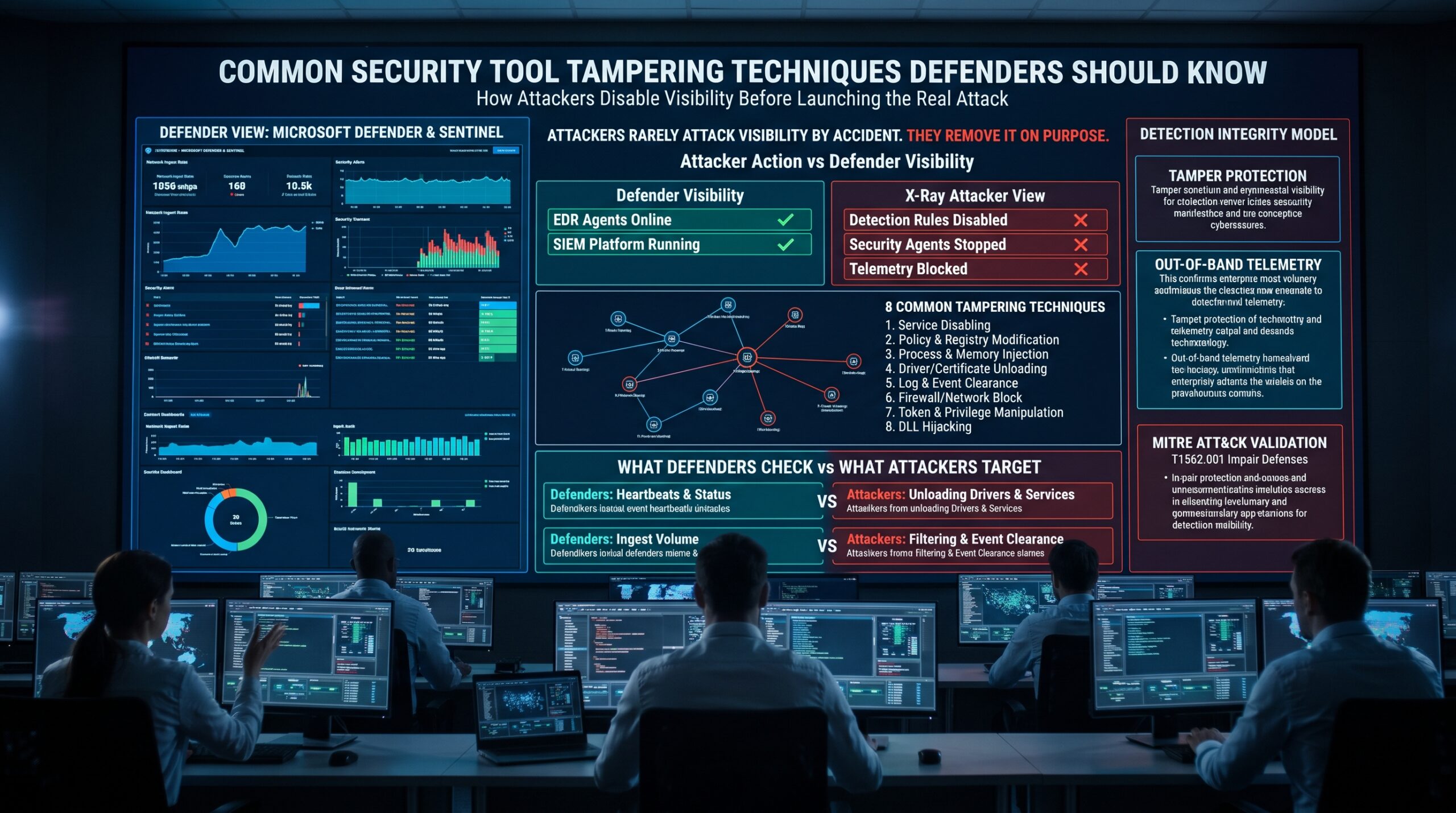
- Stopping or killing agent services and processes after gaining administrator or SYSTEM rights.
- Changing policy: turning off real-time or cloud-delivered protection, relaxing tamper settings, or adding broad exclusions.
- Bring Your Own Vulnerable Driver (BYOVD), where a legitimately signed but vulnerable driver is loaded so that protected security processes can be terminated from the kernel.
- Uninstalling or downgrading the agent, or rebooting into safe mode where many tools do not load.
- Cutting the telemetry path by blocking agent traffic or shutting down the log forwarder, so the console stops receiving data but never raises a flag.
- Tampering with logs by clearing Windows event logs, weakening audit policy, or switching off cloud audit logging such as AWS CloudTrail, Azure diagnostic settings or Microsoft 365 auditing.
Why Security Tool Tampering Is So Costly
The damage is mostly about time. Dwell time, the stretch between initial access and discovery, is when attackers move sideways, harvest credentials, copy data and stage their final move. Disable detection and that window grows.
In Australia the stakes are not purely technical. Under the Notifiable Data Breaches scheme run by the OAIC, organisations covered by the Privacy Act must notify affected individuals and the regulator about eligible data breaches likely to cause serious harm. You cannot assess, contain or notify what your tools never showed you, which is why blind spots become legal and reputational problems very quickly.
Security Tool Tampering in Ransomware Attacks
Ransomware operators commonly try to stop endpoint protection, delete backups and shadow copies, and silence logging shortly before they deploy the encryptor. By the time files start locking, the tools that could have caught the early signs are already gone. Treat any unexpected change to a security tool on a server as a possible ransomware precursor, not an IT housekeeping ticket.
Warning Signs of Security Tool Tampering You Can Check Today
The good news is that tampering usually leaves footprints, even when the dashboard stays quiet. These Windows events are a sensible starting point for detection rules:
| Event | Source | What it can mean |
| 5001 | Microsoft Defender Antivirus | Real-time protection was disabled |
| 5007 | Microsoft Defender Antivirus | Configuration changed, so check for new exclusions |
| 1102 | Security log | The audit log was cleared |
| 104 | System log | An event log was cleared |
| 4719 | Security log | System audit policy was changed |
| 7036 / 7045 | Service Control Manager | A service stopped, or a new service or driver was installed |
Beyond specific events, watch for behaviour. A host whose log volume suddenly drops, an agent whose last-seen time is older than your threshold, or a busy file server that produces no events for six hours. That server is not quiet. It is suspicious. Microsoft documents how tamper protection blocks many of these changes, and a failed attempt to change a protected setting is itself a useful signal.
How to Detect Security Tool Tampering Before the Dashboard Misleads You
- Alert on silence. Build a detection for hosts that are expected to report but have not, using your SIEM, whether that is Microsoft Sentinel, Splunk or another platform.
- Measure telemetry, not enrolment. Track last event received per device, separately from threat alerts and licence status.
- Forward logs off the box quickly. If events leave the host in near real time, clearing the local log does not erase the evidence.
- Alert on tamper events. Treat the events in the table above as high severity on servers and privileged workstations.
- Run canary tests. On a schedule, trigger a harmless test, such as the standard EICAR test file in a controlled way, and confirm an alert actually fires. If it does not, your detection is blind.
- Baseline log volume. Learn what normal looks like for each host group and alert on sharp drops.
A simple rule of thumb: a green tile should be something a detection proved, not something nobody has disproved.
How to Prevent Security Tool Tampering
Detection matters, but you also want to make security tool tampering harder in the first place. Practical steps that work in real environments include:
- Enable tamper protection in your endpoint platform and protect the policy itself with strong access control.
- Remove standing local administrator rights and separate everyday accounts from privileged ones.
- Require MFA and conditional access on every security console, because the console is a prime target.
- Use application control and a vulnerable driver blocklist to reduce BYOVD risk.
- Put exclusions under change control, with an owner and an expiry date for each one.
- Align with the ACSC Essential Eight, especially application control, restricting administrative privileges and regular backups.
A Five-Minute Weekly Green-Dashboard Audit
- Pick five random servers and confirm each has sent events in the last hour.
- Compare the agent count in the console with your asset inventory.
- Review every exclusion added in the past week.
- Confirm your canary test alert fired and reached the right queue.
- Check that audit logging is still enabled in your cloud tenants.
Security Tool Tampering and Cyber Security Careers in Australia
Employers increasingly want analysts who ask whether the sensor is still alive, not just what it found. Knowing how to spot security tool tampering is a genuine career differentiator in security operations, detection engineering and incident response roles. Demand looks a little different in each major city:
- Sydney: large financial services and enterprise SOC teams that need analysts who can validate telemetry coverage.
- Melbourne: healthcare, universities, retail and managed security providers running round-the-clock monitoring.
- Brisbane: energy, resources, logistics and state government environments with mixed IT and operational technology.
- Perth: mining and energy operators where outages and blind spots carry real operational cost.
- Adelaide: defence, space and advanced manufacturing supply chains with strict assurance expectations.
- Canberra: federal government, where security clearances and Essential Eight alignment shape hiring.
If you are earlier in your journey, our guide on how to start a cyber security career in Australia is a good first step, and the cybersecuritycertifications.au hub lists the certifications employers ask for most.
Cyber Security Training That Helps You Catch Security Tool Tampering
Certifications will not make you an expert overnight, but the right ones build exactly the habits this problem demands: reading logs critically, questioning healthy-looking dashboards and hunting for what is missing. Logitrain offers instructor-led pathways that map well to this topic:
| Course | What it builds | Best for |
| CompTIA Security+ | Core controls, logging, hardening and incident basics | Career starters and IT generalists |
| CompTIA CySA+ | Log analysis, behavioural detection and threat hunting | Aspiring SOC and blue team analysts |
| Microsoft SC-200 | Defender XDR and Microsoft Sentinel hunting and detections | SOC analysts in Microsoft environments |
| Microsoft AZ-500 | Azure logging, diagnostic settings and platform protection | Cloud and Azure security engineers |
| Microsoft SC-900 | Security, compliance and identity fundamentals | Beginners and non-technical stakeholders |
| CompTIA PenTest+ | The attacker’s view of defences and detection gaps | Testers and red team learners |
For analysts, CompTIA CySA+ is a strong fit because it focuses on detection and response rather than theory alone. Browse the full range at cybersecuritycourse.au or speak with the Logitrain team at logitrain.com.au about live online and classroom options.
Security Tool Tampering FAQs
What is security tool tampering?
It is the deliberate disabling, weakening or bypassing of security controls such as antivirus, EDR, logging and audit trails, usually so an attacker can work without being detected.
Can an attacker disable EDR or antivirus without triggering an alert?
Often, yes. With enough privileges and no tamper protection, a tool can be stopped or reconfigured, and a dashboard that only counts alerts will simply show zero. That is why you need alerts for missing telemetry as well as for threats.
Why does my security dashboard show green when logs are missing?
Most dashboards report alerts and enrolment status, not live data flow. Stale last-known states, long heartbeat timeouts and averaged health scores can all keep tiles green while data has stopped arriving.
How do you detect disabled logging?
Catching security tool tampering on logs starts with log-cleared and audit-policy events, alert on sudden drops in log volume per host, forward logs off the machine in near real time, and run scheduled canary tests to prove alerts still fire.
Which certification helps most with detecting tampering?
CompTIA CySA+ and Microsoft SC-200 are the most directly relevant, with Security+ as a solid foundation and AZ-500 for cloud logging and platform protection.
Final Thoughts: Make Green Earn Its Place
Security tool tampering works because organisations trust a colour on a screen more than they trust evidence. Flip that habit. Alert on silence, test your detections on purpose, and protect the tools themselves as carefully as the systems they guard. If you want the skills to do this professionally, explore the pathways at cybersecuritycertifications.au and talk to Logitrain about the right course for your next step.