


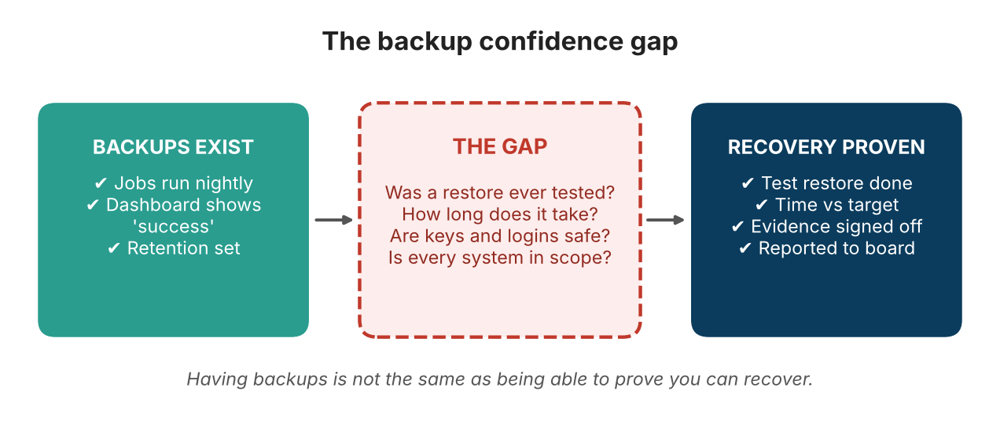
The backup confidence gap is the distance between having backups and being able to prove, with evidence, that you can recover from them. Almost every Australian organisation has backups. The jobs run every night, the dashboard shows green ticks, and the retention policy sits in a document somewhere. Ask the harder question, though, and the room goes quiet: when did we last restore a critical system from those backups, and how long did it actually take?
That silence matters. A backup is only a promise, and recovery is the moment the promise is tested, usually during a ransomware attack, a failed upgrade or a hardware loss, when nobody has time to find out the promise was empty. This guide explains what the backup confidence gap is, why it exists, what it costs, how to measure it and how security teams in Sydney, Melbourne, Brisbane, Perth, Adelaide and Canberra can close it.
What Is the Backup Confidence Gap?
The backup confidence gap is the difference between assuming you can recover and knowing you can. On one side sits evidence of effort: backup software is installed, jobs are scheduled and reports say “completed”. On the other side sits evidence of outcome: a tested restore, a measured recovery time and a sign-off from the people who depend on the system. Most organisations have plenty of the first and very little of the second.
The backup confidence gap is easy to miss because backup tools measure the wrong thing. A green status usually means data was copied, not that it can be restored, that it is complete, or that the systems around it will come back in the right order. Confidence built on that status is borrowed confidence, and it is spent the first time a real recovery is needed.
Why Backups Succeed but Recovery Fails
Backup failures during recovery are rarely dramatic. They come from small, ordinary gaps that nobody noticed because nobody tested. These are the most common causes.
- Success means copied, not restorable. A completed job does not prove the data is intact, consistent or usable by the application that needs it.
- Restores are never practised. Many teams test only a single file, if anything, and never a full system or a whole business service.
- Scope drifts. New servers, databases, cloud workloads and SaaS tools are added to the business but not to the backup plan.
- Keys and credentials are missing. Encryption keys, backup console logins and service accounts are often stored inside the very environment that has just been lost.
- Dependencies are forgotten. Identity services, DNS and databases must come back in a specific order, and that order is rarely written down.
- Attackers target backups. Ransomware operators commonly try to find, encrypt or delete backup copies before triggering the main attack.
- Cloud data is assumed safe. Cloud and SaaS providers work on a shared responsibility model, so the customer is usually still responsible for protecting and recovering their own data.
- Recovery takes longer than expected. Restoring large volumes over limited bandwidth can take days, far beyond what the business assumed.
- Knowledge sits with one person. The procedure lives in someone’s head, and that person is on leave or has left.
Key Terms: RPO, RTO and Restore Evidence
Closing the backup confidence gap starts with a shared vocabulary. Three terms matter most.
- Recovery point objective (RPO): how much data loss the business can tolerate, measured in time. An RPO of four hours means you can afford to lose up to four hours of changes.
- Recovery time objective (RTO): how long the business can wait for a system to come back before the impact becomes unacceptable.
- Restore evidence: proof from a real test, such as the date, the system, the time taken, the integrity check and who approved the result.
A backup that meets its RPO but misses its RTO is still a failure from the business’s point of view. This is why recovery time has to be measured in a test, not estimated from a vendor brochure.
Signs of a Backup Confidence Gap in Your Organisation
You can often spot a backup confidence gap before a crisis exposes it. Watch for these signals.
- Nobody can state the date of the last full restore test for each critical system.
- Backup reports are reviewed for job failures but never for restore results.
- RPO and RTO targets exist on paper but were never checked against real test results.
- The backup environment shares logins or networks with the production environment.
- Leaders believe “the cloud takes care of it” without a documented recovery process.
- Recovery runbooks are missing, outdated or stored only on systems that would be unavailable in an incident.
- An auditor, insurer or board member asks for evidence and the team has to build it from scratch.
What the Backup Confidence Gap Costs
The direct cost of a failed recovery is obvious: extended downtime, lost data and emergency spending. The hidden cost of the backup confidence gap is just as real and shows up earlier.
- Longer outages. Teams lose precious hours discovering what is and is not recoverable while the business waits.
- Weaker negotiating position. An organisation that cannot restore is more likely to feel forced into difficult decisions during a ransomware incident.
- Regulatory and contractual exposure. Expectations around backup and recovery appear in several Australian frameworks, including the Essential Eight, APRA requirements and privacy obligations.
- Insurance and audit friction. Insurers and auditors increasingly ask for proof, not policy statements.
- Lost trust. Customers, staff and boards judge an organisation by how quickly and cleanly it recovers.
The Australian Signals Directorate’s Australian Cyber Security Centre lists regular backups as one of the Essential Eight mitigation strategies, and its guidance expects restoration to be tested, not just configured. For regulated financial entities, APRA expects business continuity arrangements to be maintained and tested. And if personal information is lost in an incident, the Office of the Australian Information Commissioner oversees notifiable data breach obligations. Each of these points back to the same question: can you prove it?
This theme connects closely to a wider problem we explore in security control effectiveness, where organisations struggle to show that any of their controls work as intended.
How to Measure the Backup Confidence Gap
You can measure the backup confidence gap in a few weeks without buying any new tools. The goal is a simple, honest picture of what is proven and what is merely assumed.
- List your critical systems and data. Include databases, identity services, file stores, line-of-business applications, cloud workloads and SaaS platforms.
- Set an RPO and RTO for each. Agree the targets with the business owners, not just with IT.
- Record the last successful restore test. For each system, write down the date, scope and result. A blank cell is a finding.
- Measure real recovery time. Run a test and time it from the moment of failure to a working service, then compare it with the RTO.
- Check integrity. Confirm the restored data is complete and that the application actually works with it.
- Score each system. Mark it as proven, partly proven or unproven. The number of unproven critical systems is your backup confidence gap.
How to Close the Backup Confidence Gap
Closing the backup confidence gap is a routine, not a project. The aim is to turn restore testing into a regular habit with visible evidence. These actions deliver most of the value.
- Follow the 3-2-1 principle and go one better. Keep three copies on two types of media with one off-site, and add an offline or immutable copy that attackers cannot easily alter.
- Test restores on a schedule. Make restore testing a calendar item for every critical system, not an occasional favour.
- Test beyond single files. Practise restoring full servers, databases and whole business services, including the order in which they return.
- Separate the backup environment. Use dedicated credentials, multi-factor authentication and network separation so one compromise cannot reach everything.
- Protect keys and runbooks. Store encryption keys and recovery procedures somewhere that remains available during an outage.
- Watch for scope drift. Link the backup plan to your asset inventory so new systems are added automatically.
- Include SaaS and cloud data. Confirm what your providers back up and what you must protect yourself.
- Run a tabletop exercise. Walk executives through a realistic recovery scenario so decisions are rehearsed before they are needed.
- Report restore success to leadership. Track the percentage of critical systems with a proven, recent restore and share it as a standard security metric.
- Build recovery skills in the team. People who have practised a restore recover faster than people reading instructions for the first time.
A Simple Restore-Testing Schedule
There is no single correct frequency, and your regulatory and risk context should drive the final answer. The table below is a practical starting point for planning.
| System tier | Suggested test | Typical frequency |
| Tier 1: business critical | Full system and application restore with timed recovery | Quarterly |
| Tier 2: important | Full restore of selected systems and data integrity check | Twice a year |
| Tier 3: standard | File and folder restore spot checks | Annually |
| All tiers | Review of backup scope, keys and runbooks | After any major change |
Backup Confidence Gap Across Australian Cities
The pressure points vary between cities and sectors. You can compare training options for each location on our locations page.
Sydney
Banks, insurers and technology firms in Sydney operate under heavy regulatory and customer scrutiny, so proven recovery is a business requirement. See our cyber security training in Sydney.
Melbourne
Healthcare, education and government organisations in Melbourne hold sensitive records that must be recoverable quickly. Explore cyber security training in Melbourne.
Brisbane
Infrastructure, resources and public sector teams in Queensland depend on continuous operations. Browse cyber security training in Brisbane.
Perth
Mining and energy operations in Western Australia often span remote sites with limited bandwidth, which makes realistic restore timing especially important. Check out cyber security training in Perth.
Adelaide
Defence-related, manufacturing and health organisations in South Australia need dependable recovery for sensitive systems. Learn more about cyber security training in Adelaide.
Canberra
Federal agencies in Canberra work under the Australian Government’s security framework, where the Essential Eight is a central expectation. View cyber security training in Canberra.
Cyber Security Skills That Close the Backup Confidence Gap
Recovery is a skill as much as a technology. Our cyber security certification courses in Australia build the knowledge your team needs to design, test and prove resilient systems.
- CompTIA Security+: an entry-level, all-round course that builds a solid foundation, including resilience and recovery concepts.
- CompTIA CySA+: an advanced course for analysts who detect, respond to and recover from incidents.
- CompTIA PenTest+: for professionals who test systems the way attackers do, including how backups and credentials could be exposed.
- Palo Alto PCNSA: for security engineers working with Palo Alto devices and network protection.
- Microsoft AZ-500: for professionals securing Azure workloads and data.
Not sure which pathway fits? Our FAQ page explains who the courses suit and how they are delivered, and the blog has more articles, including the cybersecurity visibility gap, permission creep and the machine identity blind spot.
Frequently Asked Questions About the Backup Confidence Gap
What is the backup confidence gap?
It is the difference between having backups and being able to prove you can recover from them. It is closed by regular, evidenced restore testing.
How often should backups be tested?
It depends on how critical the system is and on your regulatory context. A common approach is quarterly full tests for critical systems, less often for lower tiers, and a fresh test after any major change.
What is the difference between RPO and RTO?
RPO is how much data you can afford to lose, measured in time. RTO is how long you can afford to wait for a system to be restored.
Does cloud storage mean my data is backed up?
Not necessarily. Cloud and SaaS providers operate under a shared responsibility model, so you should confirm what they protect and what you must back up and recover yourself.
Which course helps with backup and recovery skills?
CompTIA Security+ covers resilience and recovery concepts at foundation level, while CySA+ goes deeper into incident response, and AZ-500 focuses on securing Azure environments.
Final Thoughts: Replace Assumption with Evidence
Backups are necessary, but they are not proof. The backup confidence gap closes only when you restore, measure and record. Start with your most critical system, run a timed test, write down what you learn, and repeat. Within a few cycles, a comforting assumption becomes a documented capability that you can show a board, an auditor or a regulator.
Ready to build the skills to do it? Visit Cybersecurity Certifications Australia, explore the full course list, or contact our team or call 1300 649 299 to speak with a course advisor.